Virtual Display Manager 3 | 3.3.2.46315 (Nov 24, 2026)
Application compatibility and exclusions.
Standalone utility version 1.0.0.1 for VDM Classic.
Application exclusion management is integrated into VDM 4. For VDM Classic, configure driver-level exclusions with the standalone VDM Driver Exclusion Utility.
Runtime and driver-level exclusions
VDM provides a versatile runtime application exclusion feature, enabling specific applications to bypass VDM control when required. This can be accomplished in two ways:
- On-the-fly Exclusion: Use the
Ctrl+Altkey combination while maximizing a window to exclude it temporarily. - Persistent Exclusion: Configure VDM to exclude applications persistently during their runtime.
For scenarios where stricter exclusion measures are necessary—such as in video games with advanced memory protection or anti-cheat systems that only allow whitelisted applications—VDM supports driver-level exclusions. This approach ensures compatibility by bypassing VDM control at the driver level, avoiding potential conflicts or errors.
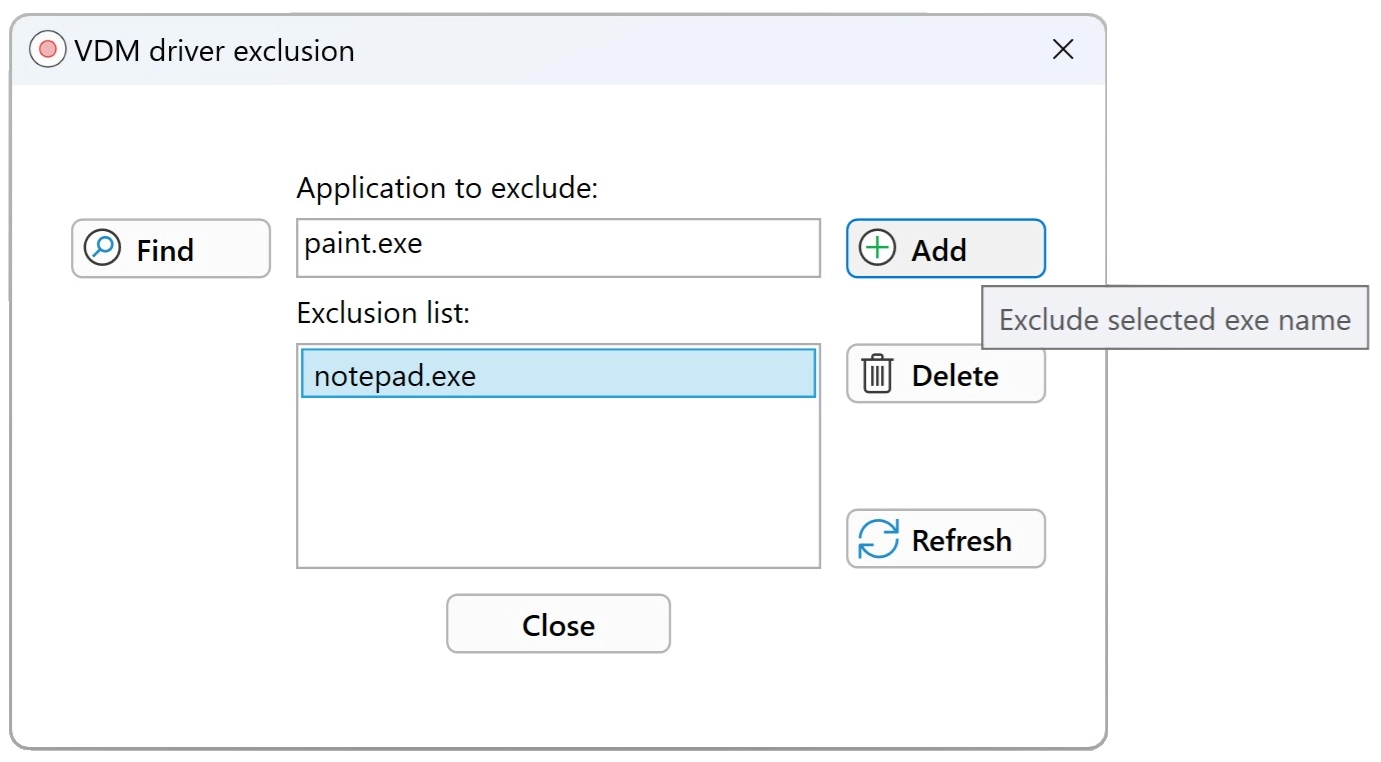
VDM Classic uses the standalone utility below to configure driver-level exclusions. This feature is integrated into VDM 4.
Using the standalone utility
- Manual Input: Add the executable name of the application to exclude.
- Built-in Finder: Easily locate and select the executable.
- Administrative Privileges: Required to apply changes.
- Reboot Requirement: A system restart is necessary for the changes to take effect.
Utility interface
Contact support if you need help with application compatibility.